

Many business owners believe website security issues always come from WordPress, plugins, or weak passwords. When something goes wrong, they immediately look inside the website dashboard for answers. In most cases, that approach works.
But not always.
Recently, a critical incident revealed a risk that many businesses overlook. A website appeared compromised even though WordPress core, plugins, and the database were completely clean. The problem was not visible inside the website at all.
The issue existed at the hosting level.
This article explains what happened, why shared hosting environments can create risks outside a business owner’s control, and what website owners using GoDaddy or Namecheap hosting should understand to protect their online presence.
Understanding Where Website Security Problems Usually Come From
Most website security incidents follow familiar patterns. A plugin is outdated. A theme has a vulnerability. An admin password is weak.
Because of this, business owners often assume that every security issue starts inside the website. This assumption can delay the real solution when the problem exists elsewhere.
Websites rely on hosting servers to deliver content. If the server environment is compromised, malware can appear even when the website itself is clean.
A Real Case That Exposed a Hidden Hosting Risk
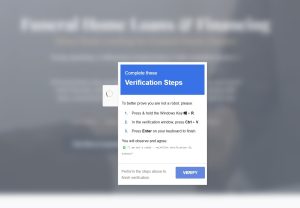
In a recent case, a business website suddenly began showing fake CAPTCHA pages. Visitors were prompted to complete verification steps that attempted to run malicious commands on their devices.
Initial checks were thorough.
>> WordPress core files were clean.
>> Installed plugins showed no malicious code.
>> The database contained no suspicious entries.
Despite this, malware continued to appear.
This ruled out the most common causes and pointed toward a deeper issue.
How Server Level Injection Happens
Server level injection occurs when malicious code is introduced before the website loads. This means the server delivers altered content to visitors, even though the website files remain unchanged.
This type of attack bypasses WordPress entirely.
It often happens in shared hosting environments where multiple websites share the same server resources. If one account is compromised, others can be exposed due to configuration weaknesses.
Why Shared Hosting Creates Unique Security Risks
Shared hosting is popular because it is affordable and easy to manage. However, it comes with trade offs that many business owners are not aware of.
Shared hosting risks include:
- Multiple websites running on the same server
- Limited isolation between accounts
- Shared resources that can be abused
- Dependence on provider level security controls
When isolation fails, one compromised site can affect others, even if those sites are properly maintained.
Why This Type of Malware Is Hard to Detect
Server level malware does not always leave visible traces inside the website.
Traditional security scans may show:
- No infected files
- No suspicious database entries
- No unauthorized users
Because the injection happens before the site loads, it can evade standard cleanup tools. This leads to confusion and repeated failed fixes.
Why Website Owners Cannot Fix This Alone
When the hosting environment is compromised, website owners have limited control.
Access to server level configurations is restricted. Only the hosting provider can:
- Identify injected server scripts
- Remove malicious server rules
- Restore secure configurations
- Isolate affected accounts properly
This is why repeated website cleanups fail until the hosting issue is resolved.
How Hosting Providers Typically Handle These Incidents
Once identified, hosting providers may take different actions depending on severity.
Common responses include:
- Server wide security scans
- Removal of malicious injections
- Account isolation adjustments
- Temporary site suspensions
- Recommendations to migrate hosting
The speed and effectiveness of the response depend on the provider’s security practices.
Business Impact Beyond Technical Damage
Server level malware affects more than just website files.
It can impact:
- Visitor trust
- Search engine reputation
- Browser security warnings
- Brand credibility
- Lead generation
Even short exposure can have lasting effects if visitors associate the brand with unsafe behavior.
Warning Signs Businesses Should Not Ignore
Many businesses do not realize hosting issues until damage escalates.
Common warning signs include:
- Fake CAPTCHA or verification pages
- Redirects that appear randomly
- Security warnings from browsers
- Complaints from visitors
- Search console alerts
Early detection reduces long term impact.
Why Regular Monitoring and Backups Matter
External monitoring tools can detect abnormal behavior early. Backups allow quick recovery when issues occur.
Monitoring and backups are essential because they provide visibility beyond the website dashboard. They act as an early warning system when hosting problems arise.
How Businesses Should Evaluate Hosting Security
Price should not be the primary factor when choosing hosting for a business website.
Key security considerations include:
- Account isolation strength
- Proactive malware detection
- Incident response process
- Server hardening practices
- Support access during emergencies
Businesses handling sensitive data or high traffic should review whether shared hosting meets their risk tolerance.
When Migration Becomes the Safer Option
In some cases, cleaning the hosting environment is not enough. Repeated incidents may indicate deeper infrastructure issues.
Migration to a more secure hosting environment can reduce exposure. This is often the best long term decision for critical business websites.
Final Thoughts on Hosting Level Security Risks
Not all malware incidents originate from the website itself. Hosting environments play a critical role in website security.
This incident serves as a reminder that security responsibility is shared between website owners and hosting providers. Understanding this distinction helps businesses respond faster and protect their visitors more effectively.
Website security is not just about what you install. It is also about where your website lives.
Conclusion
Website security issues do not always start inside WordPress. As this incident shows, vulnerabilities at the hosting level can expose visitors to serious risks even when a website appears clean. Shared hosting environments, while affordable, can introduce security challenges that are outside a business owner’s direct control.
Understanding where these risks come from helps businesses respond faster, reduce damage, and make better hosting decisions. Security is not just about maintenance. It is about visibility, monitoring, and choosing the right infrastructure for the importance of your website.
Why Choose Dexora Digital
Dexora Digital works with businesses that need clarity during complex website security incidents. We focus on identifying the true source of problems rather than applying surface level fixes.
Our experience includes diagnosing server level issues, coordinating with hosting providers, and helping businesses decide when cleanup is sufficient or when migration is the safer long term option. We approach security incidents calmly, systematically, and with the goal of protecting both visitors and brand reputation.
Our work is built around prevention, early detection, and informed decision making rather than fear driven responses.
Need Help Identifying a Website Security Issue
If you are experiencing unusual website behavior and cannot identify the cause, it is important to investigate the issue carefully before more damage occurs. Some security problems originate outside the website itself and require deeper analysis. If you need help understanding what is happening or deciding the next steps, you can contact Dexora Digital for guidance and resolution support.
FAQs
What is a server level website security issue
A server level issue occurs when malicious code is injected at the hosting environment rather than inside the website files or database.
Can a website be infected even if WordPress is clean
Yes. Malware can be injected before the site loads, making WordPress appear clean while visitors are still exposed.
Why does shared hosting increase security risk
Shared hosting places multiple websites on the same server, which can create exposure if isolation between accounts fails.
Are GoDaddy and Namecheap unsafe for websites
Not necessarily. They offer many hosting options, but shared hosting environments require additional security awareness.
Why did fake CAPTCHA pages appear on a clean site
These pages are often injected at the server level and are designed to trick visitors into running malicious actions.
Can website owners fix server level malware themselves
No. Only the hosting provider has access to remove malicious server configurations.
How can I tell if malware is coming from hosting
If scans show a clean website but malware still appears, the hosting environment may be the source.
Will reinstalling WordPress fix this problem
No. Reinstalling WordPress does not remove server level injections.
Can this affect SEO and search rankings
Yes. Malware exposure can lead to browser warnings, ranking drops, and loss of trust.
Should I change passwords if this happens
Yes. While it may not be the cause, changing credentials is a good precaution.
How long does hosting cleanup usually take
It depends on the provider, but server level reviews often take longer than website cleanups.
Is migrating hosting always necessary
Not always. Migration is recommended if issues repeat or if security confidence is low.
What type of hosting is safer for businesses
Isolated environments such as managed hosting or VPS typically offer stronger security controls.
Do backups help with server level malware
Backups help recovery but do not fix compromised hosting environments on their own.
Can this affect visitor devices
Yes. Some malware attempts to trick visitors into running harmful commands.
Should businesses monitor sites externally
Yes. External monitoring can detect issues that internal tools may miss.
Is this type of attack common
It is less common than plugin vulnerabilities but can have greater impact when it occurs.
Does SSL prevent server level attacks
SSL protects data in transit but does not stop server level injections.
Can hosting providers deny responsibility
Some may, which is why documentation and escalation are important.
How can businesses reduce future risk
Choose secure hosting, monitor regularly, maintain backups, and respond quickly to unusual behavior.

Local SEO and AI Search (AEO & GEO) Specialist.
Building search visibility that converts into qualified demand.
Today, businesses need visibility on Google Maps and AI powered search and websites that actually convert visitors into leads. I am a Local SEO, AI Search & Conversion Rate Optimization (CRO) Specialist with 5+ years of hands on experience helping businesses turn underperforming websites into high converting growth engines. My work combines Local SEO, Technical SEO, Semantic SEO, GEO/AEO, and conversion focused landing page optimization to ensure brands are discoverable and profitable.
My Experience
I have delivered SEO and web growth projects across the US, UK, Australia, Canada, Finland, Germany, and the Czech Republic, working in industries such as local businesses (electrician, hvac, cleaning, Real estate, healthcare, B2B, eCommerce, SaaS, and environmental services.
Some Results
>> 200+ websites audited globally
>> specifically worked with 100+ local business (80% from USA)
>> 80+ websites improved through technical SEO & schema fixes
>> 20+ businesses featured in Google AI Overviews (SGE)
>> Multi million impression growth for eCommerce & SaaS brands
Book Free Consultation: calendly.com/dexora/30min
