

Technical SEO that ranks. And actually holds.
We fix the technical foundations holding your website back — fast indexing, passing Core Web Vitals, and AI search access from day one.
AI citations / mo
Top Rated Plus
Official Badge
100% Issues Fixes
Since 2019
7,407+ AI Citations
ChatGPT · Gemini
740+
SEO audits delivered
Your website is technically broken and you have no idea.
Slow load times are losing visitors before they read a single word. Pages Google cannot crawl cannot rank. Schema errors mean AI engines cannot understand your business. Duplicate content splits your authority in half.
We have audited over 500 US websites. The average site has 47 crawl errors. Most business owners have never seen the list. Their SEO agency has never mentioned it.
Content will not save a broken foundation. Links will not either. Technical SEO is what makes every other investment in your site actually work.
The most expensive SEO mistake is building content and links on a site that Google cannot fully read.
AI search can't find you
Your robots.txt is blocking GPTBot, ClaudeBot, and PerplexityBot — accidentally.
Core Web Vitals are failing
LCP over 4s. INP lagging. CLS jumping. Google is suppressing rankings.
Indexing is broken
Pages aren't getting crawled. Schema is missing. Canonicals are misfiring.
- What is Technical SEO
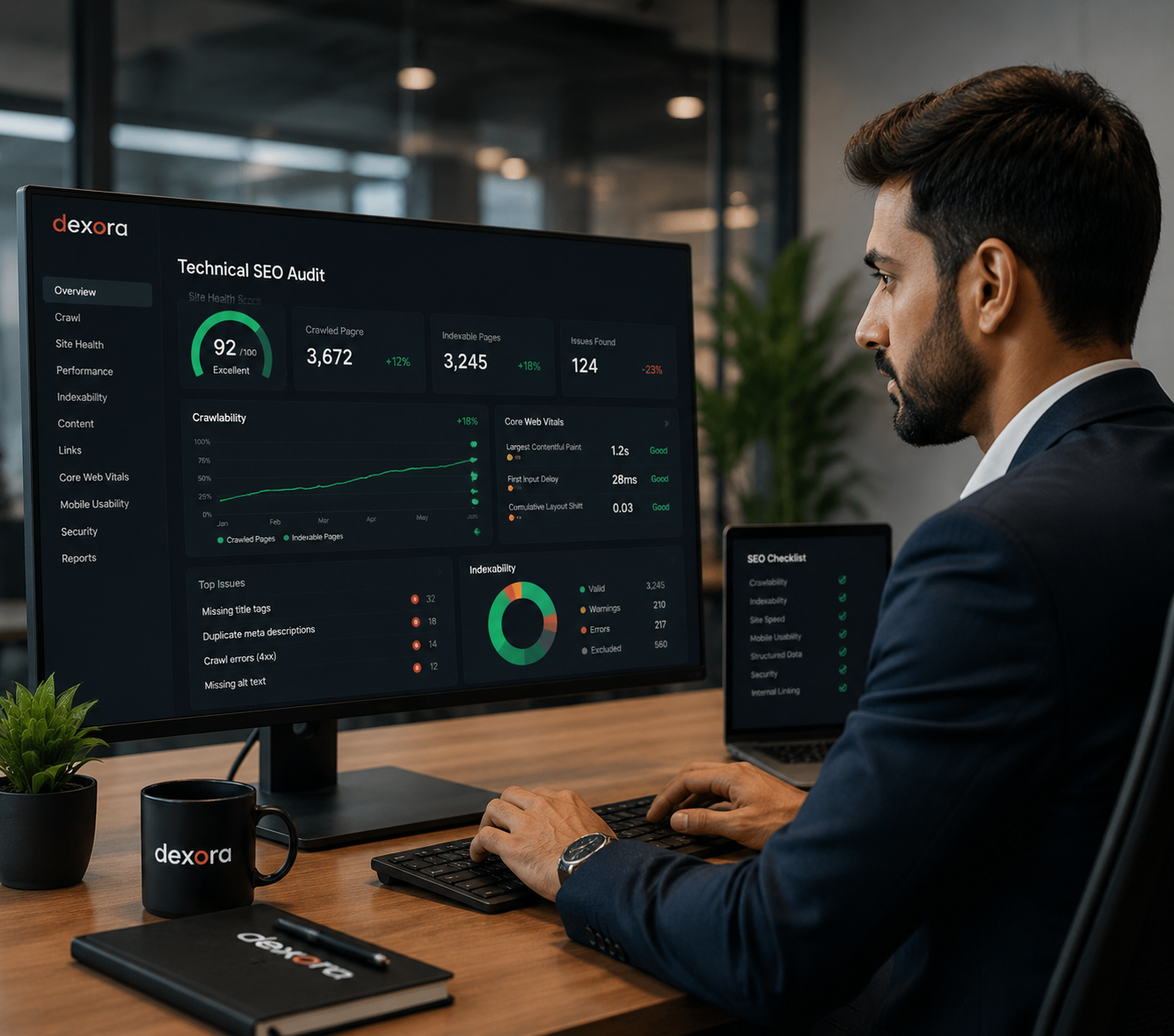
Technical SEO is everything that affects how search engines access, crawl, index, and understand your site.
It is not content. It is not links. It is the infrastructure underneath — the signals search engines and AI tools use to decide whether your site deserves to rank and be cited. Core Web Vitals. Crawl budget. Sitemap structure. Canonical tags. Schema markup. Redirect chains. Hreflang. Mobile rendering. Server response times. AI crawler access. All of it.
- Search engines crawl and index every important page
- Core Web Vitals pass on mobile and desktop
- AI systems can read, parse, and cite your content
Key Distinction
Most businesses have never had anyone look at all of it together — as a system. That is what we do.
The DEXORA Framework.
A repeatable, six-pillar operating system we’ve refined across 740+ audits in 50 US states. Same playbook for a 5-page local site or a 50,000-URL enterprise stack.
Why it works
Most agencies stop at “audit”. We own the entire loop — diagnosis, implementation, measurement, and iteration — so improvements actually ship.
D
01
Diagnose
740-point technical audit across crawl, index, render, and AI access.
E
02
Engineer
Senior dev team ships fixes to your stack — no hand-off, no theory.
X
03
eXamine
Every change validated with GSC, Screaming Frog, and PageSpeed data.
O
04
Optimize
Compounding monthly improvements to keep gains and outrank competitors.
R
05
Report
Plain-English reports tied to revenue — not vanity rank trackers.
A
06
Accelerate
AI search visibility layer: GPTBot, ClaudeBot, schema, llms.txt.
- What's Included
Every technical lever, handled.
Foundation
Full Site Crawl Audit
Screaming Frog deep scan of every URL, link, redirect, and status code.
Quick Win
AI Crawler Access Fix
Unblock GPTBot, ClaudeBot, PerplexityBot, and Google-Extended.
Major
Core Web Vitals Repair
Hit green on LCP, INP, and CLS across mobile and desktop.
Foundation
Schema Markup Build
Organization, LocalBusiness, FAQ, Service, BreadcrumbList — validated.
Quick Win
Indexability Audit
Fix robots.txt, sitemaps, canonicals, redirect chains, orphan pages.
Foundation
HTTPS & Security
Mixed content, certificate, HSTS, and security header configuration.
Ongoing
Crawl Budget Optimization
Free up Google’s crawl budget for pages that actually drive revenue.
Ongoing
International / hreflang
Correct hreflang for multi-region or multi-language sites.
Ongoing
GSC Setup & Monitoring
Property setup, sitemap submission, weekly anomaly alerts.
Technical SEO is not a one-time fix. It is ongoing infrastructure maintenance.
Search engines change their algorithms. Your site changes as you add pages and products. Competitors invest and close the gap. Core Web Vitals benchmarks shift.
Our retainer clients get monthly technical reviews, schema updates, CWV monitoring, and direct access to Taqweem — not a junior account manager who joined the agency six weeks ago.
01
- Week 1
Full Site Audit
Diagnose every issue across 7 dimensions — crawl, index, speed, schema, AI access, security, mobile.
02
- Week 2
Prioritized Roadmap
Findings sorted by Impact × Effort. Quick wins first. Major projects scoped with timelines.
03
- Week 3-6
Implementation
Our devs push fixes — robots.txt, schema, redirects, Core Web Vitals — without breaking anything.
04
- Ongoing
Monitor & Compound
Weekly GSC alerts, monthly health checks, continuous improvement.
You're not getting a junior account manager. You're getting the founder.
I personally review every work we deliver. Every client gets direct access to me — not an account manager who reads from a template. I will tell you honestly what your site needs, how long it will take, and what it will cost. Including if I think you do not need us.
- 12+ years in technical SEO
- Ex-Lead SEO at 2 acquired SaaS
- Author · 'AI Search Playbook'
- Direct contributor on 740+ audits
Recent Case Studies
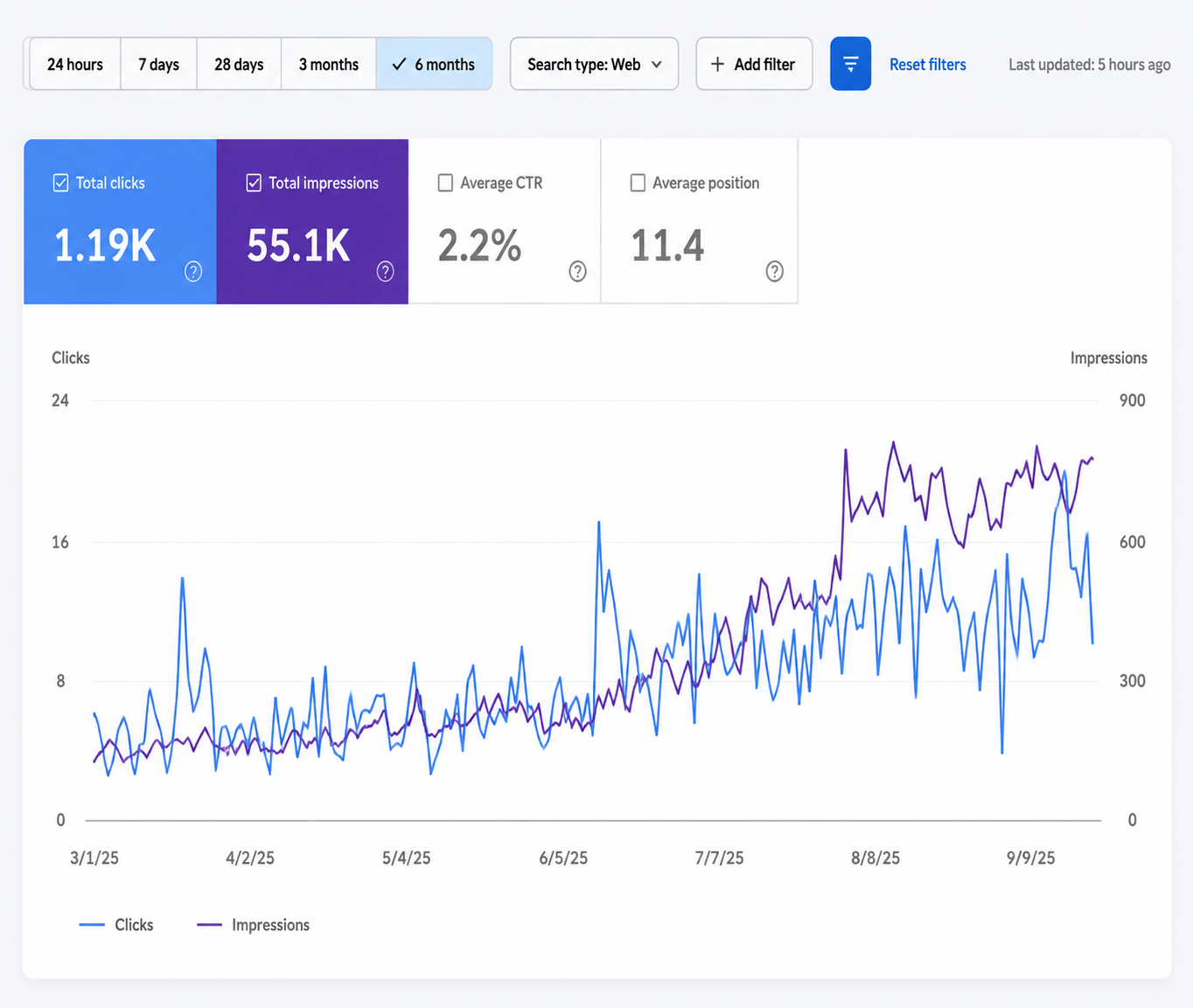
Three businesses. Three engagements. Three sets of numbers verified by Google Search Console and Google Business Profile exports.

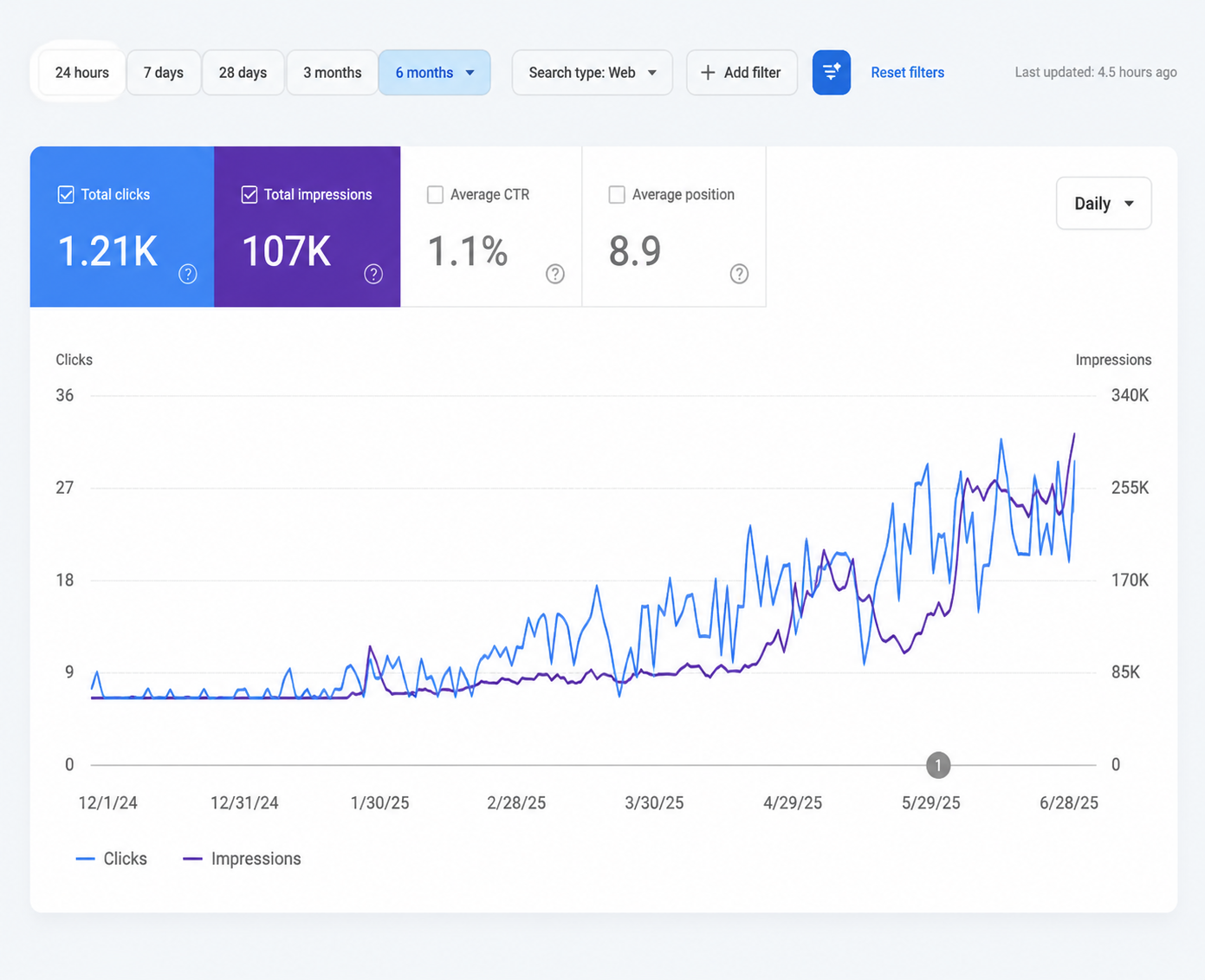
From Zero to 107,000 Google Impressions — How a Melbourne Furniture Restoration Business Became Visible Everywhere in 6 Months
The Quick Numbers Metric Starting Point 6 Months Later Website Did not exist Live, ranking, growing Google Impressions 0 107,000 Organic Clicks 0 1,210 Average

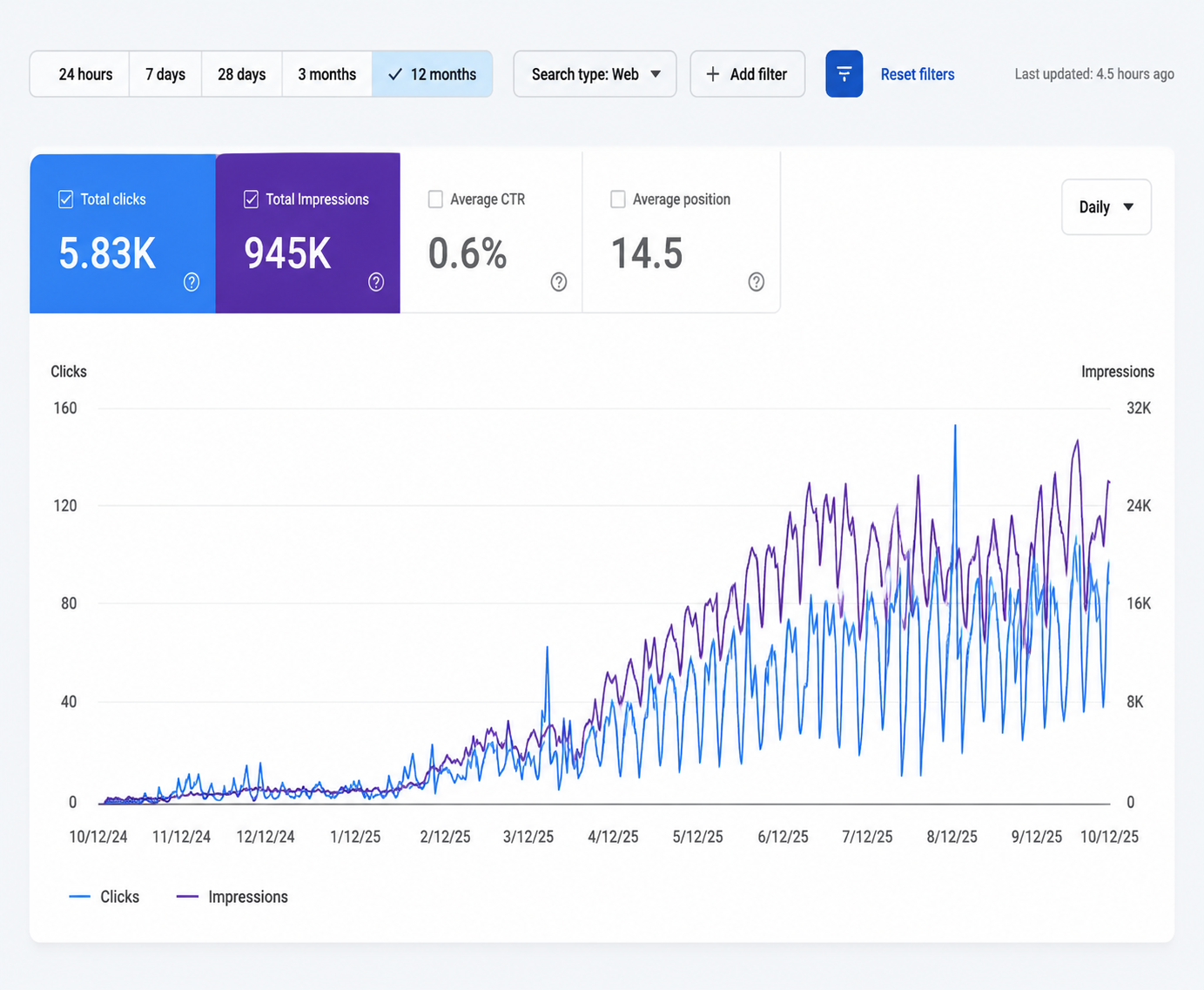
How Dexora Digital Took Power Engineering Business from Zero to DR 70 and 8,119 AI Citations — in 15 Months
Most businesses with a website think they have an SEO strategy. They don’t. They have a website. A specialist US electrical engineering firm, had exactly
Actual GSC data.
- Client Reviews
Real founders. Real numbers.
4.9 / 5·Based on 280+ verified reviews
"Core Web Vitals were destroying our paid CAC. Dexora rebuilt the front-end performance layer in three weeks. LCP dropped from 4.2s to 1.3s — checkout conversion is up 38%."
Rachel Nguyen Marketing Director · Northwind SaaS"Core Web Vitals were destroying our paid CAC. Dexora rebuilt the front-end performance layer in three weeks. LCP dropped from 4.2s to 1.3s — checkout conversion is up 38%."
Rachel Nguyen Marketing Director · Northwind SaaS100% Issues Fixes
Since 2019
7,407+ AI Citations
ChatGPT · Gemini
740+
SEO audits delivered
- Pricing
Fixed scope. Real numbers.
No “contact us for pricing” games. Pick the package that fits.
Audit
$499 One-time
- Full 7-dimension audit
- Prioritized 90-day roadmap
- GSC + Screaming Frog data export
- 30-min review call
Implementation
$1,800/mo · 3 mo min
Diagnose every technical issue in 48 hours.
- Everything in Audit
- Dev team executes fixes
- Schema & CWV implementation
- Weekly progress reports
Growth Retainer
Custom Ongoing
Continuous technical + AI search ownership.
- Everything in Implementation
- AI citation tracking
- Monthly competitive teardowns
- Dedicated SEO director
48-hour audit
Or it's free
30-day guarantee
Full refund, no questions
Fixed scope, fixed price
No surprise invoices
Direct senior access
No account-manager wall
FAQs About Technical SEO
Technical SEO is the infrastructure layer of your website — the code, configuration, and architecture that determines whether search engines and AI systems can crawl, index, and understand your pages at all. Content SEO is what your pages say. Technical SEO determines whether Google can hear them.
You can publish the most comprehensive, expertly written content in your industry. If your site has crawl errors, slow page speed, broken canonical tags, or blocked AI crawlers, that content will never rank regardless of how good it is. Technical SEO does not compete with content — it is the foundation that makes content investment return anything at all.
Most websites with serious technical SEO problems show no obvious symptoms to the human eye. The site looks fine, loads acceptably, and functions normally for visitors. The problems are invisible until you examine the site from a search engine's perspective.
Warning signs include: ranking positions flat or declining despite publishing new content, pages that Google has crawled but not indexed, Core Web Vitals scores below Google's thresholds, significant gaps between total published pages and pages appearing in Google Search Console, and organic traffic that has dropped without any obvious reason.
Crawling and indexing are two separate steps. Crawling is when Googlebot visits your page and reads its content. Indexing is when Google adds that page to its search database and makes it eligible to appear in search results.
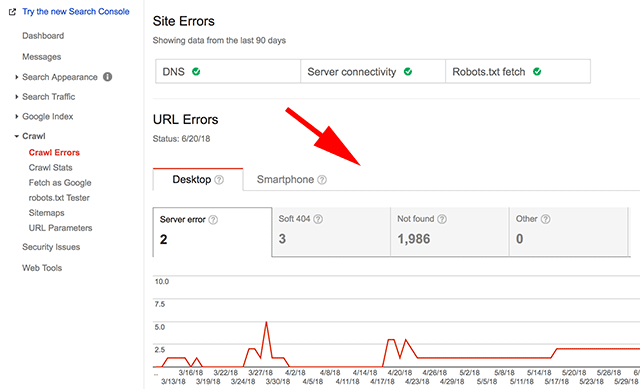
A crawl error means Google tried to visit the page and failed — because of a server error, a robots.txt block, or a redirect chain. An indexing error means Google crawled the page successfully but chose not to add it to the index — because of a noindex tag, thin content, canonical pointing elsewhere, or a duplicate content issue. Both suppress rankings but require different fixes. Google Search Console shows both separately under Coverage.
Core Web Vitals are three specific page experience metrics Google uses as direct ranking factors. LCP (Largest Contentful Paint) measures how quickly the main content loads — threshold is under 2.5 seconds. INP (Interaction to Next Paint) replaced FID in 2024 and measures how responsive the page is to user interaction — threshold is under 200 milliseconds. CLS (Cumulative Layout Shift) measures visual stability — threshold is under 0.1.
Failing any of these creates a structural ranking disadvantage applied across every page on your website simultaneously. Only 43 percent of websites currently pass all three on mobile. Most businesses have never checked. Their SEO agency has never mentioned it.
Google uses mobile-first indexing, which means the mobile version of your website is the primary version Google evaluates for ranking purposes. If your mobile experience differs from your desktop experience — slower load times, missing content, different structured data, layout issues — Google is evaluating the inferior version.
Common mobile-specific problems include images not compressed for mobile, render-blocking JavaScript heavier on mobile connections, touch targets too small for fingers, font sizes below 16px requiring zooming, and horizontal scroll caused by fixed-width elements. The fix requires auditing your Core Web Vitals specifically on mobile, not desktop.
Schema markup is structured data code written in JSON-LD format that tells Google and AI systems exactly what your content means in machine-readable format. Without schema, Google has to infer what your business is, what services you offer, where you operate, and what your content covers from text alone. This inference is imprecise and often wrong.
For AI search — ChatGPT, Perplexity, Google AI Overviews — schema is a primary signal for citation eligibility. FAQPage schema specifically labels your question-and-answer content as intended direct answers. Without it, AI systems have no reliable way to identify your content as citable.
It can be, partially. Google core updates evaluate both content quality and technical infrastructure signals simultaneously. When we audit sites that lost traffic in core updates, we consistently find a combination of both issues. The content quality problems are usually the primary cause.
But technical issues — slow mobile speed, thin pages indexed that should not be, canonical confusion spreading authority across duplicate URLs, and blocked AI crawlers — all amplify content quality problems. A site with excellent content but poor technical infrastructure is more vulnerable to core update impact than a site with the same content and a clean technical foundation.
Crawl budget is the number of pages Googlebot will crawl on your website within a given time period. Every website has a crawl budget determined by its authority and server performance. For small websites under 1,000 pages, crawl budget is rarely a limiting factor.
For larger websites — eCommerce stores with thousands of product pages, publications with years of content, directory sites — crawl budget management becomes critical. If Googlebot is wasting its budget on low-value pages like URL parameters, faceted navigation, tag archives, and paginated pages, it may not crawl your important commercial pages at all.
A canonical tag is an HTML element that tells Google which version of a URL is the primary preferred version when multiple URLs contain similar or identical content. eCommerce sites commonly have the same product appearing at multiple URLs due to category navigation, filter parameters, and sorting options.
A canonical pointing to the wrong page, a canonical chain where A points to B which points to C, or a noindex page that is also canonicalized creates specific indexing failures that are invisible to the human eye but measurably suppress rankings.
Website migrations are the most common cause of sudden, severe organic traffic loss in established websites. The most frequent failures are: redirect mapping not completed for all old URLs; canonical tags pointing to the old domain; the new site left in noindex state from the development environment; XML sitemaps not updated; and page speed on the new platform significantly slower than the old one.
Recovery requires auditing every old URL, implementing correct 301 redirects to new URL equivalents, verifying canonicals, resubmitting sitemaps, and monitoring GSC coverage daily for the first month.
A 301 redirect is permanent. It tells Google that the old URL has permanently moved to the new URL and that all ranking authority associated with the old URL should be transferred to the new one. A 302 redirect is temporary. It tells Google the old URL is temporarily sending traffic elsewhere but will return.
Google does not transfer ranking authority through a 302 redirect in the same way it does through a 301. If you have permanently moved pages or your entire domain and used 302 redirects, you are blocking the authority transfer the move was supposed to achieve. This is one of the most common migration errors we find and it is invisible unless you specifically check the redirect type.
Indexed but not ranking means Google is aware of your pages and has included them in its database but does not consider them relevant or authoritative enough to show for any queries. This is different from not being indexed at all.
The most common causes are: no clear topical focus satisfying the search intent of a specific query; competition from stronger, more established pages from higher authority domains; missing EEAT signals — Experience, Expertise, Authoritativeness, Trustworthiness; technical issues like slow load time suppressing the page; or thin content that covers a topic too superficially.
Hreflang is an HTML attribute that tells Google which language and geographic version of a page to serve to users in different countries. If you have a website in English and Spanish, or if you serve both the United States and the United Kingdom with different content, hreflang signals prevent Google from showing the wrong version to the wrong audience.
The most common errors are: missing return tags — if page A points to page B as an alternate, page B must point back to page A; incorrect language codes; hreflang pointing to redirected or noindexed pages; and inconsistent hreflang between sitemap and page-level implementation. One misconfigured hreflang tag can silently suppress international search visibility for months.
An XML sitemap is a file that lists all the URLs on your website you want Google to crawl and index, structured in a format Google can read efficiently. It is the navigation guide you provide Googlebot for discovering and prioritizing your pages.
Common sitemap errors include: 404 URLs listed pointing to pages that no longer exist; noindex pages listed which creates a contradictory signal; redirected URLs not updated to their final destinations; and important pages excluded from the sitemap entirely. We have audited sitemaps where over 30 percent of listed URLs were either 404s or noindexed — actively misleading Google about what it should crawl.
AI search systems — ChatGPT, Perplexity, Claude, Google AI Overviews — use separate crawlers with separate robots.txt access rules from Googlebot. Most websites built before 2023 are accidentally blocking these crawlers through legacy configurations. GPTBot accesses content for ChatGPT. ClaudeBot for Claude. PerplexityBot for Perplexity. Google-Extended for Google AI Overviews.
If these are blocked in your robots.txt, your website does not exist to those AI systems regardless of how well you rank in traditional Google search. Beyond access, AI systems specifically evaluate FAQPage schema for citation eligibility, entity signal consistency for verification, and direct factual answer content structured for extraction.
Page speed affects rankings through two separate mechanisms. The first is direct: Google uses Core Web Vitals as confirmed ranking factors, and slow pages fail these metrics and receive a structural ranking disadvantage. The second is indirect: slow pages produce poor user experience signals — high bounce rates, short session durations, low pages-per-session — that Google uses as long-term signals of content quality satisfaction.
The most common causes of slow page speed are uncompressed images, render-blocking JavaScript, no browser caching, slow server response times (TTFB above 200ms), and unoptimized third-party scripts from analytics, chat widgets, and advertising pixels.
Internal links serve two purposes simultaneously: they help users navigate your content, and they distribute ranking authority from pages that have earned external links to pages that have not. An internal linking audit identifies orphaned pages that receive no internal links and therefore no authority, and identifies opportunities to connect high-authority pages to important commercial pages through contextually relevant anchor text.
Businesses with large blogs often have years of content that earns links and builds authority but fails to channel that authority toward their service and product pages. Fixing the internal linking structure is one of the highest-impact technical SEO changes available without producing any new content.
Yes, and this is one of the most important risks of inexperienced technical SEO implementation. The most damaging examples are: adding a noindex tag to the wrong pages and accidentally removing important pages from Google's index; implementing a robots.txt disallow rule that blocks Googlebot from an entire section of the site; setting up canonical tags incorrectly; implementing 302 redirects instead of 301 redirects; and changing URL structures without setting up redirects.
All of these are real errors we have encountered when auditing sites that received previous technical SEO work. Every fix we implement is verified in Google Search Console before we mark it complete and we document before-and-after data for every change made.
Duplicate content means the same or substantially similar content appearing at multiple URLs on your website. Google cannot rank two versions of the same content simultaneously so it must choose one and suppress the other. When you have not told Google which version to prefer through canonical tags, Google makes its own choice — and it frequently chooses the wrong one.
Common sources of unintentional duplicate content are: www versus non-www versions of your site both being accessible; HTTP and HTTPS both accessible; URLs with and without trailing slashes; product pages accessible through multiple category paths; session IDs or tracking parameters creating unique URLs for the same page. Each duplicate dilutes the authority that should be concentrated on a single canonical version.
Manual actions and algorithmic demotions produce different symptoms and require different responses. A manual action is a direct penalty applied by a Google reviewer for a specific violation — spammy links, thin content, structured data abuse. Manual actions appear in Google Search Console under Security and Manual Actions with a specific description of the violation.
Algorithmic demotions manifest as traffic drops coinciding with confirmed Google update dates. Technical problems produce a third pattern — gradual ranking decline or plateau without coinciding with specific update dates, accompanied by increasing crawl errors or Core Web Vitals failures in Search Console. Distinguishing between these three scenarios determines which type of work is needed first.
Can’t find what you’re looking for? Book a free 30-min strategy call.
Ready to See What’s Holding Your Website Back?
Trusted by businesses across the US (United States) and Global Market.
✔ technical issues hurting rankings
✔ local SEO gaps
✔ AI search visibility opportunities
✔ quick wins for more leads
What Business Owners Across the United States Says About Us
Trusted by businesses across the US (United States) and Global Market.
Latest Insights
Google Core Update 2025-2026: Complete Analysis, Winners, Losers & Action Plan
Google does not send you a warning. One morning your traffic is normal. The next morning…
Content Gap Analysis: How to Find the Keywords Your Competitors Rank for That You Don’t
Your competitors are visible for searches you can't see. Not because they are smarter. Because they…
How to Write SEO Content That Actually Ranks in 2026 — The Real Process
The worst SEO content ever written is probably sitting on your website right now. Not because…
What Is a Meta Description — And How to Write One That Actually Gets the Click
Your meta description is free advertising. It sits in Google's search results. Millions of potential customers…
How to Use Google Search Console for SEO — The Reports That Actually Matter
Google gives every website owner direct access to how Google sees their site. Most businesses barely…
Long-Tail Keywords: Why Lower Volume Often Means Higher ROI
The businesses that grow fastest through SEO are almost never the ones targeting the biggest keywords.…


"Core Web Vitals were destroying our paid CAC. Dexora rebuilt the front-end performance layer in three weeks. LCP dropped from 4.2s to 1.3s — checkout conversion is up 38%."
Rachel Nguyen Marketing Director · Northwind SaaS