

Your meta description is free advertising. It sits in Google’s search results. Millions of potential customers read it before deciding whether to visit your site.
Most businesses either leave it blank (Google generates one automatically, usually badly) or write something generic that looks like every competitor.
Here is exactly what a meta description is, why it matters even though it isn’t a direct ranking factor, and a precise formula for writing ones that earn clicks.
Metadata optimisation is part of every technical SEO review we conduct →
What a Meta Description Is — and What It Does
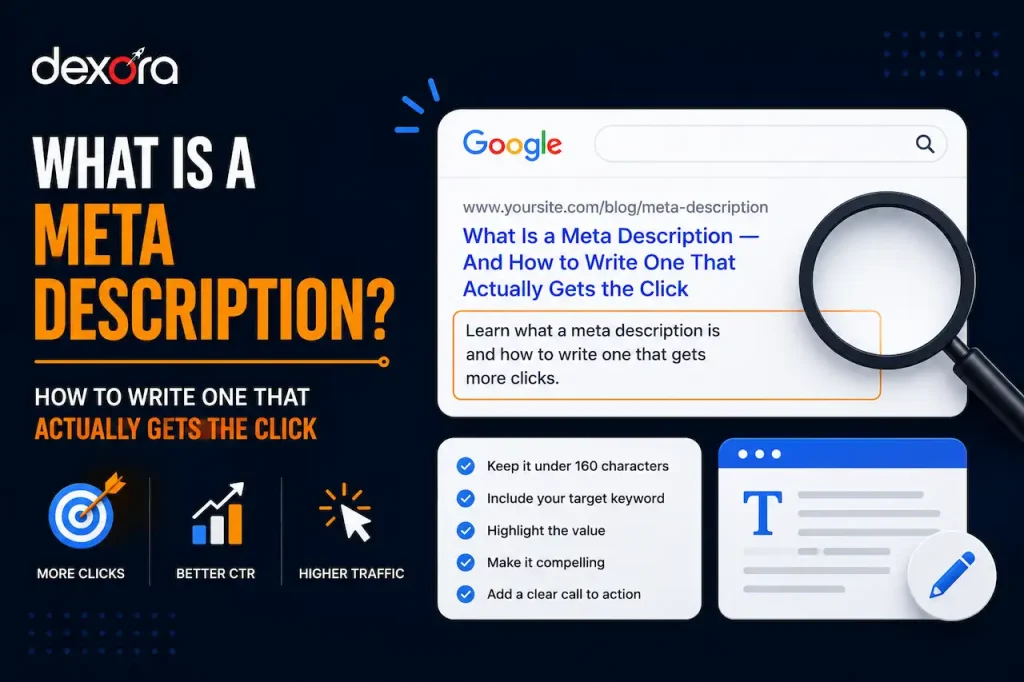
A meta description is a short HTML attribute — 150 to 160 characters — that describes the content of a web page. It appears as the grey text beneath the blue page title link in Google’s search results.
What it does not do: directly affect your Google rankings. Google confirmed long ago that the meta description is not a ranking signal.
What it does do: determine whether someone who sees your result in the search page actually clicks it. Click-through rate (CTR) is a user behaviour signal that Google does factor into its ranking algorithm. Better CTR from search results means more clicks means potentially higher rankings over time.
Meta descriptions don’t get you ranked. They determine what you do with the ranking you have.
Google’s guidance on how to write helpful meta descriptions →
Why Most Meta Descriptions Fail
Walk through Google’s search results for any commercial keyword. Read the meta descriptions.
Most of them are generic, vague, or written by someone who has never thought about click-through rate. ‘We offer professional SEO services for businesses of all sizes.’ ‘Welcome to our plumbing services page.’ These are not descriptions. They are placeholders.
The opportunity is significant. Most of your competitors are leaving CTR on the table with weak metadata. A well-written meta description consistently outperforms a mediocre one by 20–40% click-through rate.
A page that ranks third but has a compelling meta description will often receive more clicks than the page in second place with a generic one.
Why Google Sometimes Ignores Your Meta Description
Google reserves the right to generate its own snippet from your page content if it decides your meta description doesn’t match the query. This happens most often when: the meta description is too generic, it doesn’t contain keywords matching the search query, or Google finds a better excerpt from the page.
To maximise the chances Google shows your meta description: include the primary keyword naturally in the description, keep it within 150–160 characters, and write it as a genuine summary of what the page covers.
The Formula for a High-CTR Meta Description
After analysing hundreds of meta descriptions and their corresponding click-through rates across client sites, here is the formula that consistently performs best.
Element 1: State the Benefit, Not the Feature
Bad: ‘Our local SEO services include Google Business Profile optimisation and citation building.’
Good: ‘Rank in Google Maps and get found by local customers — without paid ads. Here’s how local SEO works for service businesses.’
The first describes what you do. The second describes what happens to the reader as a result.
Element 2: Include the Primary Keyword Naturally
Google bolds any words in the meta description that match the search query. This bold text makes your listing visually stand out. Include your primary keyword — and ideally a secondary variation — naturally within the description.
Element 3: Create Mild Urgency or Curiosity
Words like ‘here’s how,’ ‘the truth about,’ ‘what nobody tells you,’ ‘exactly what’ — these create enough curiosity to earn the click without being click-bait.
Specificity also works: ‘7 local SEO tactics that work for plumbers in 2026’ is more clickable than ‘guide to local SEO for plumbers.’
Element 4: Keep It Within 155 Characters
Google truncates meta descriptions that are too long — usually after around 155–160 characters. Put the most important information in the first 120 characters in case of truncation on mobile devices.
Portent CTR study on how title tags and meta descriptions affect click behaviour →
Meta Description Best Practices — The Complete List
For Service Pages
Service pages should answer the implicit question: ‘What will this do for me?’ Include the service, the benefit, the target audience, and ideally a point of differentiation. ‘Custom local SEO for home service businesses. Google Maps, citations, and GBP — all managed for you. Free audit included.’
For Blog Posts
Blog meta descriptions should tell the reader what they will learn or be able to do after reading. Specific, benefit-focused. ‘Exactly how to use Google Search Console to find quick-win SEO opportunities — even if you’ve never opened it before. Step-by-step guide.’
For Location Pages
Location pages should mention the location prominently and the service, with a local specific benefit. ‘SEO services in Bristol, UK. We help local businesses rank on Google Maps and page 1. Free Bristol SEO audit available.’
For eCommerce Category Pages
Category page descriptions should include the product range, key benefit, and a differentiator if possible. ‘Browse 200+ running shoes from Nike, ASICS, Brooks, and more. Free delivery and returns. Expert fit advice available online.’
Common Meta Description Mistakes
Mistake: Leaving the meta description blank. Why it happens: it’s not an obvious failure. What it costs you: Google auto-generates one from your page content, often pulling a random paragraph that makes no sense out of context.
Mistake: Using the same meta description on multiple pages. Why it happens: copy-paste convenience. What it costs you: Google ignores identical meta descriptions. Each page needs a unique description.
Mistake: Writing the description for the page topic rather than the searcher’s need. Why it happens: natural instinct is to describe the content. What it costs you: descriptions that accurately summarise the page but don’t address why the searcher would want to read it.
Mistake: Keyword stuffing the description. Why it happens: keywords seem like the SEO priority. What it costs you: a description that reads like a keyword list rather than a compelling reason to click. Google may rewrite it entirely.
Search Engine Land on click-through rate optimisation in organic search →
FAQ: Meta Descriptions
Q: Does a meta description affect SEO rankings?
A: Not directly. Google has confirmed that meta descriptions are not a ranking signal. However, they significantly affect click-through rate — how many people click your result when it appears. A higher CTR for a given ranking position is itself a positive user behaviour signal that can influence rankings over time. The indirect effect is real and measurable.
Q: What is the ideal length for a meta description?
A: 150 to 160 characters — including spaces. Shorter than this often fails to describe the page adequately. Longer descriptions get truncated by Google, especially on mobile (which truncates sooner, at around 120 characters). Put the most critical information in the first 120 characters as a safeguard.
Q: What happens if I don’t write a meta description?
A: Google automatically generates a description from your page content — typically pulling text from the most relevant passage it finds. Auto-generated snippets are often contextually accurate but rarely compelling. They are almost always generic compared to a deliberately written description. Writing your own meta descriptions consistently outperforms auto-generated ones for CTR.
Q: Should every page on my website have a meta description?
A: Every page you want to rank and receive clicks from should have a unique, carefully written meta description. Pages you have deliberately excluded from indexing (via noindex tags) or low-priority internal pages (login pages, internal search results) don’t require them. For any page in your sitemap and indexed by Google — write one.
Q: Can I use the same keyword in both the title tag and meta description?
A: Yes — and you should. The primary keyword should appear naturally in both. When a searcher’s query matches terms in both your title tag and meta description, both are bolded in the search results, making your listing visually more prominent. Consistency between the title, description, and page content also reinforces relevance signals.
Every Search Result is an Ad You’re Not Running Yet
Think about it differently. Your search result appears in front of someone who just searched for exactly what you offer. That is a warm, interested, active potential customer.
Your meta description is the only sales copy they see before they decide whether to visit you. Most businesses treat it as a footnote. The businesses that treat it as prime advertising copy consistently out-click their rankings.
Write them seriously. Rewrite the weakest ones regularly. Track your CTR in Google Search Console. It is one of the highest-ROI, lowest-cost improvements in all of SEO.
Metadata is part of the comprehensive on-page SEO work that drives rankings →
Your meta description is the first sentence of a conversation with your next customer. Make it count.
We audit metadata across your entire site as part of every SEO review →
We’ll rewrite your 10 highest-impact meta descriptions as part of your free audit findings.
Get Your Free Meta Description Audit →