
Most businesses that come to me saying their website is not ranking have one thing in common. They have never had a proper technical SEO audit. They have had someone run a basic tool, screenshot a score, and call it a review. That is not an audit. That is a surface check.
A real technical SEO audit is a systematic forensic investigation of every page on your website. It answers the question Google cannot answer for itself when it tries to crawl your site. Why is this page not performing the way it should?
Screaming Frog SEO Spider is the industry standard tool for this kind of work and when it is set up correctly with full API integrations it gives you a level of diagnostic clarity that no other tool can match. This guide covers exactly how we run technical audits at Dexora Digital, what each integration reveals, and what to do with everything you find.
Why Most SEO Audits Miss the Real Problems
Before getting into the tool setup I want to explain why the standard approach to SEO auditing fails most businesses.
Generic online audit tools check surface level signals. They tell you your title tag is too long or your page loads slowly. That is useful but it is incomplete. What they cannot tell you is why a specific page that should be ranking for a high value keyword is sitting at position 34. What they cannot show you is that three of your most important service pages have no internal link support from anywhere else on the site. What they miss entirely is the interaction between your technical health, your content depth, and your actual search performance.
Connecting Screaming Frog to Google Search Console, Semrush, and the PageSpeed API simultaneously means every technical issue appears alongside real performance data. You are not just finding problems. You are understanding the business impact of each problem.I cover the foundation of what technical SEO involves in our complete technical SEO audit checklist. This article goes deeper into the tooling and methodology behind a proper audit.
Setting Up Screaming Frog With Full API Integrations
The standard Screaming Frog crawl without integrations gives you a useful list of technical issues. The same crawl with all integrations active gives you a complete picture of your website’s health from every angle simultaneously.

Here is exactly how each integration works and what it adds.
Google Search Console Integration
Connecting Google Search Console directly to Screaming Frog means every URL in your crawl is matched against real GSC data. You can see clicks, impressions, CTR, and average position for every page in your crawl results alongside every technical issue found on that same page.
This combination reveals something that neither tool shows alone. A page might be technically clean but generating zero impressions despite targeting a high volume keyword. Or a page with a missing H1 might be generating 500 impressions but converting none of them into clicks because the title tag it is inheriting is not compelling.
To connect GSC in Screaming Frog go to Configuration then API Access then Google Search Console. Authenticate with your Google account, select your property, and set your date range. I typically use 90 days to get a representative performance picture.
Once connected add the GSC columns to your main crawl view. Clicks, impressions, CTR, and position all appear inline with your technical data.
The most powerful use of this integration is filtering. Filter your crawl to show only pages with more than 100 impressions and zero clicks. These are your highest priority CTR optimization opportunities. Every page in that filter is appearing in search but something about how it presents in results is preventing people from clicking through. Almost always the fix is title tag and meta description rewriting.For a complete understanding of how CTR connects to your overall search visibility read our guide on how to improve website visibility in search results.
Semrush API Integration
The Semrush integration pulls authority and competitive data directly into your crawl. Every URL gets its Semrush metrics attached including keyword rankings, organic traffic estimates, and backlink data.
This means you can immediately identify which pages are generating organic traffic versus which pages have no Semrush visibility at all. Pages with strong content and good technical health but no Semrush visibility often have an authority problem rather than a technical one. They need backlinks. Pages with existing Semrush traffic but declining positions often have a content freshness or competitive displacement problem.To connect Semrush go to Configuration then API Access then Semrush. Enter your API key from your Semrush account. Set the country database to match your target market. For USA focused clients I always use the US database. For our work on local SEO services targeting specific states and cities this country-level filtering is particularly important.
PageSpeed Insights API Integration
This is the integration that saves the most time on large sites. Instead of manually running Google PageSpeed Insights on individual pages, connecting the API pulls Core Web Vitals scores for every single URL during the crawl automatically.
Every page gets its LCP, CLS, TBT, FCP, and overall Performance Score attached directly to the crawl row. On a 200 page website this means you have complete PageSpeed data for every page in the time it takes to run one crawl.
To connect PageSpeed go to Configuration then API Access then PageSpeed Insights. Enter your Google API key. Choose mobile or desktop. I always run mobile first because Google uses mobile-first indexing and most service business websites get the majority of their traffic on mobile.
The most common finding from the PageSpeed integration is that performance problems are concentrated on specific page types. Product pages or service pages with large uncompressed images often score in the 30 to 50 range while static informational pages score 90 plus. Knowing this at scale means you can prioritize compression and lazy loading work on exactly the pages where it will have the most ranking impact.
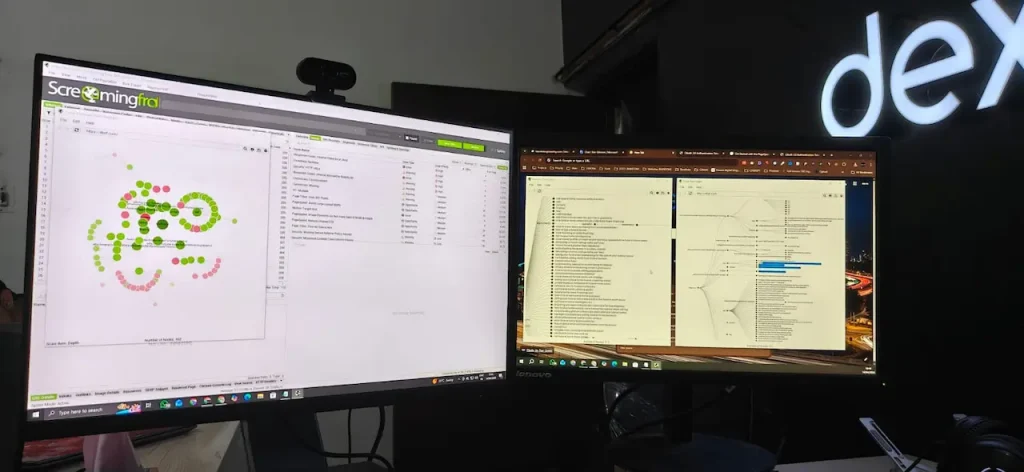
Reading the Internal Linking Visualisation
The internal linking visualisation in Screaming Frog is one of the most underused features in SEO. Most people run a crawl, look at the issues list, and never open the site architecture view. This is a mistake.

The visualisation shows every page as a node and every internal link as a connection between nodes. The size of each node represents the number of internal links pointing to that page. Larger nodes have more internal link authority flowing into them. Smaller nodes are pages that are effectively isolated from the rest of your site.
What you are looking for in this view is the alignment between your most commercially important pages and the nodes receiving the most internal link authority.
On most websites I audit there is a significant mismatch. The homepage is always the largest node because every other page links back to it in the navigation. But the individual service pages that should be receiving strong internal link support are often small nodes with only one or two links pointing to them.
This is one of the highest impact fixes available in technical SEO and it costs nothing to implement. Adding contextual internal links from high traffic blog content to your service pages transfers authority exactly where it needs to go.
I built the complete internal linking architecture for dexoradigital.com around this principle. Every article we publish links to the most relevant service page. Every service page links to related articles and other services. The result is an interconnected content network where authority flows continuously across the site rather than pooling at the homepage.Our guides on local SEO for plumbers,local SEO for HVAC companies, and local SEO for electricians are all part of a deliberate content cluster designed to funnel topical authority into the main local SEO services page.
The Priority Issue Categories to Address First
When the crawl completes Screaming Frog returns hundreds or potentially thousands of flagged items depending on site size. The key is knowing which categories to address first based on business impact rather than working through the list in the order the tool presents them.
Indexing and Crawlability Issues — Fix Immediately
Any page that should be indexed but is blocked by robots.txt or a noindex tag is the highest priority finding in any audit. A page that Google cannot see cannot rank. Check the Response Codes tab and filter for any important pages returning errors. Check the Directives tab for any unintentional noindex tags on important pages.
For websites running on WordPress this is particularly important because plugins like Yoast SEO and RankMath can accidentally set noindex on pages through misconfigured settings.
Internal Link Errors — Fix Next
Broken internal links waste crawl budget and create a poor user experience. Filter the internal tab for any links pointing to pages returning 4xx status codes. These are links pointing at pages that no longer exist. Fix them by either restoring the destination page or updating the link to point to the correct current URL.
Pay particular attention to broken links on your highest authority pages. A broken link on your homepage or a high traffic blog post is significantly more damaging than a broken link buried in a footer.
Missing and Duplicate Meta Data — Address Systematically
Filter the Page Titles tab for missing titles, duplicate titles, and titles over 60 characters. Filter the Meta Description tab for the same issues. Work through these page by page starting with your highest traffic and most commercially important pages first.
Title tags are the single highest impact on-page change you can make for CTR. Our California local SEO services page for example was specifically optimized with a title tag that targets the exact commercial intent of businesses searching for local SEO help in California rather than a generic description of the page content.
Schema and Structured Data — Implement for AI and Rich Results
The structured data tab in Screaming Frog shows which pages have schema markup and which do not. Every service page should have Service schema. The homepage should have Organization schema. Blog posts should have Article schema. FAQ sections should have FAQPage schema.
Schema markup is increasingly important not just for rich results in traditional search but for AI search visibility. Google AI Overviews, ChatGPT, and Perplexity all use structured data to extract and understand content more reliably. A page with proper FAQPage schema is significantly more likely to be cited in an AI Overview than the same page without it.
Check your current AI search visibility with our free AI Visibility Tool to see how your structured data and overall AI readiness compares.
PageSpeed by Page Type — Fix High Impact Pages First
Using the PageSpeed integration data, sort your crawl by mobile performance score ascending. The pages with the lowest scores are your priority.
For each low scoring page identify the primary causes from the PageSpeed data. Render-blocking resources, uncompressed images, unused JavaScript, and missing lazy loading are the most common culprits on service business websites. Fix the most common issue type across multiple pages simultaneously rather than fixing one page completely before moving to the next.
What to Do With the Audit Results
A technical SEO audit is only valuable if it produces clear prioritized action. Here is the framework I use to turn crawl data into a client-ready action plan.

Tier 1 — Fix within 48 hours: Indexing blocks on important pages, critical broken links, pages returning 5xx server errors, missing canonical tags causing duplicate content.
Tier 2 — Fix within 2 weeks: Title tag and meta description optimization for high traffic pages, schema markup implementation, internal linking improvements to priority service pages, image compression for slow loading pages.
Tier 3 — Fix within 30 days: Content depth improvements on thin pages, URL structure cleanup, redirect chain resolution, security header implementation.
Tier 4 — Ongoing optimization: PageSpeed improvements that require development work, content refresh for aging pages, new internal link additions as new content is published.
Every item in the audit goes into one of these four tiers based on its potential impact on rankings, traffic, and conversions. Clients receive this as a structured document with specific instructions for each fix rather than a raw list of issues.
The Connection Between Technical Health and AI Search Visibility
One thing that has become increasingly important in audits over the last 12 months is the AI crawler accessibility layer. A technically healthy website that blocks AI crawlers in its robots.txt is invisible to ChatGPT search, Perplexity recommendations, and Google AI Overviews despite potentially excellent traditional search rankings.

Screaming Frog will show you your robots.txt configuration but it will not specifically audit AI crawler access. That is why we combine the Screaming Frog technical audit with our AI visibility check as part of every complete audit we deliver.
Run your free AI readiness check at dexoradigital.com/ai-labs to see which of the eight major AI crawlers can currently access your website alongside your full technical health score.
For a complete picture of how AI search is changing what technical SEO needs to cover read our guide on what AI discoverability means for your website.
Running Your Own Screaming Frog Audit
If you want to run a Screaming Frog audit on your own website here is the minimum setup required to get useful results.
Download Screaming Frog SEO Spider at screamingfrog.co.uk. The free version crawls up to 500 URLs which is sufficient for smaller websites. The paid version at around 250 dollars per year removes the limit and enables the API integrations.
For the Google Search Console integration you need Owner or Full User level access to the property. For the Semrush integration you need a Semrush subscription with API access enabled. For PageSpeed you need a free Google API key from the Google Cloud Console.
Set your crawl configuration to include JavaScript rendering if your site uses React, Vue, or any JavaScript framework that renders content client-side. Without JavaScript rendering Screaming Frog will see the same empty shell that AI agents see when JavaScript is not rendered, which misrepresents your true content structure.
Once the crawl completes export the full results to CSV and work through the priority tiers outlined above.
If this process feels overwhelming or your website has more than 200 pages use our free SEO audit tool as a starting point to identify the highest priority issues quickly, then book a strategy call to discuss a full Screaming Frog level audit with all integrations active.
The difference between websites that rank consistently and websites that struggle is almost always found in the technical layer. And the technical layer is exactly where a properly configured Screaming Frog audit shows you what no surface level tool ever will.

Local SEO and AI Search (AEO & GEO) Specialist.
Building search visibility that converts into qualified demand.
Today, businesses need visibility on Google Maps and AI powered search and websites that actually convert visitors into leads. I am a Local SEO, AI Search & Conversion Rate Optimization (CRO) Specialist with 5+ years of hands on experience helping businesses turn underperforming websites into high converting growth engines. My work combines Local SEO, Technical SEO, Semantic SEO, GEO/AEO, and conversion focused landing page optimization to ensure brands are discoverable and profitable.
My Experience
I have delivered SEO and web growth projects across the US, UK, Australia, Canada, Finland, Germany, and the Czech Republic, working in industries such as local businesses (electrician, hvac, cleaning, Real estate, healthcare, B2B, eCommerce, SaaS, and environmental services.
Some Results
>> 200+ websites audited globally
>> specifically worked with 100+ local business (80% from USA)
>> 80+ websites improved through technical SEO & schema fixes
>> 20+ businesses featured in Google AI Overviews (SGE)
>> Multi million impression growth for eCommerce & SaaS brands
Book Free Consultation: calendly.com/dexora/30min