

If your Google Business Profile is suspended, the worst response is usually panic. Business owners often start changing the address, editing categories, creating another profile, resubmitting verification, or filing multiple appeals before understanding why Google restricted the listing.
Those actions can turn a correctable problem into a much more complicated recovery.
At Dexora Digital, I treat GBP suspension recovery as a compliance investigation first and an SEO problem second. Your priority is to identify the type of restriction, determine which information may conflict with Google’s guidelines, correct legitimate issues, prepare evidence, and submit one accurate appeal through the appropriate process.
Google states that Business Profiles may be suspended or disabled when they do not follow its guidelines. If you believe the profile should be reinstated, Google provides an official appeals process.
The key is to recover the legitimate profile without creating additional trust problems.
Need it fixed for you? Our Google Business Profile reinstatement service diagnoses the suspension, fixes the profile, prepares matching evidence and files the appeal. The first review is free and takes 24 hours.
Get a free suspension reviewSoft Suspension vs. Hard Suspension: Understand the Difference First
Before doing anything, determine what actually happened.
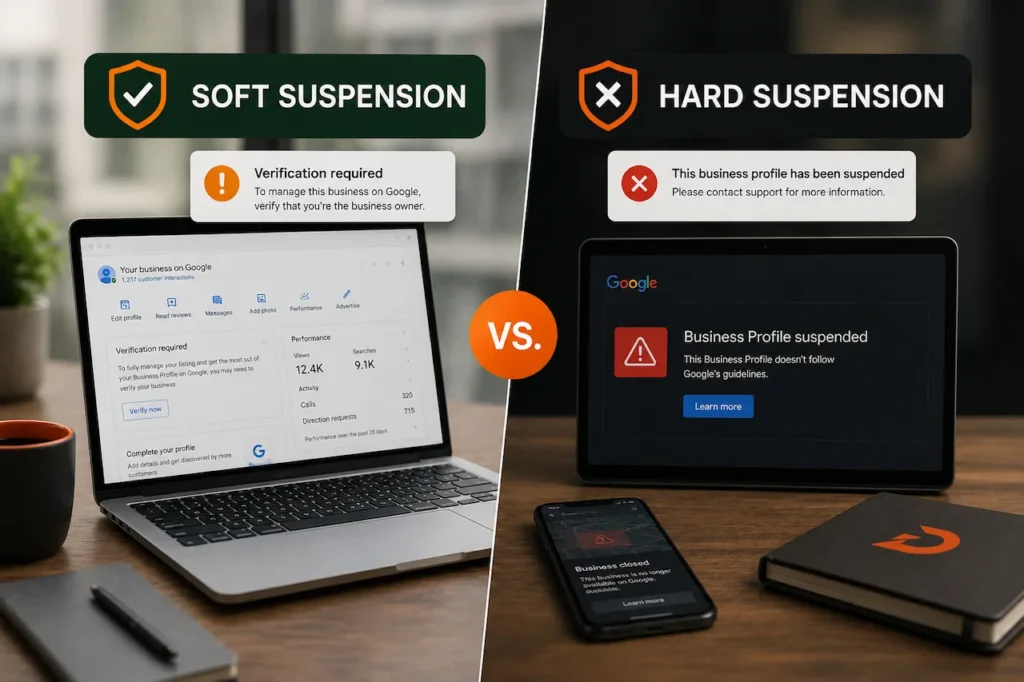
The terms soft suspension and hard suspension are widely used in local SEO, but Google does not officially classify Business Profile restrictions using those names.
They are useful shorthand for understanding how severe the situation appears.
What Local SEOs Call a Soft Suspension
A soft suspension generally describes a situation where access, verification, or management of the profile is disrupted but some business information may still appear publicly.
For example, you may discover that the profile has become unverified or that Google requires you to verify control of the business again.
A profile edit may also be rejected without the entire listing being removed.
This can happen after significant business information changes, but an edit itself should not automatically be described as a policy violation.
Google may simply need more evidence that the business information is legitimate.
The correct response depends on the exact message Google displays.
This is particularly important in categories where verification problems are common.
Our garage door GBP issues experience is a useful example. Businesses in sensitive local service categories can encounter additional verification friction after changing important profile information. That does not mean every re-verification request is a suspension.
What Local SEOs Call a Hard Suspension
A hard suspension generally describes a more serious situation where the Business Profile is removed or disabled from normal public visibility and the owner must resolve the underlying issue before the listing can operate normally again.
This can be commercially damaging.
Calls can decline.
Direction requests can disappear.
Google Maps visibility can vanish.
Branded searches may no longer display the profile normally.
For a local service business that depends heavily on Maps, the impact can be immediate.
Google’s own terminology is more important than the industry’s shorthand.
The appeals tool may tell you that a profile is suspended or disabled and can show the restricted profile, the reason for the moderation action, and a link to the relevant policy.
Use that information as the starting point.
Do not diagnose your profile based entirely on what happened to another business in a Facebook group or local SEO forum.
Unverified Does Not Always Mean Suspended
This distinction is especially important.
If Google un-verified my business profile, that does not automatically mean the profile has received the same enforcement action as a suspended listing.
Google can request verification or re-verification to confirm ownership and business legitimacy.
A rejected edit is also different from a full profile suspension.
Review restrictions are another separate issue.
Account-level restrictions are more serious again because they can affect multiple Business Profiles managed through the same Google Account.
You need to know which situation you are dealing with before selecting a recovery process.
The local SEO guide approach should always begin with classification before optimization.
Common Triggers Behind Google Business Profile Problems
Google does not publicly provide a simple list saying that one specific edit will always cause suspension.
What it does provide is a detailed set of guidelines describing how real businesses must represent themselves.
When profile information conflicts with those rules, suspension, disablement, rejected edits, additional verification, or other restrictions can follow.
The most common problems involve business identity, address eligibility, categories, duplicate profiles, and misleading engagement.
Business Name Problems
Google requires a Business Profile name to represent the business as it is consistently known in the real world.
That means the name should align with genuine branding such as signage, stationery, the website, and how customers know the company.
A common local SEO mistake is adding keywords because competitors appear to rank with them.
For example, the real business name may be:
Smith Plumbing
But the profile becomes:
Smith Plumbing Emergency Plumber Drain Cleaning Austin
That may look attractive from a keyword perspective.
It does not accurately represent the real-world name.
Google specifically warns that unnecessary information in the business name is not permitted and can result in suspension.
If your profile was suspended shortly after a name edit, compare the name against genuine business documentation and branding.
Do not simply change it again and again to see what Google accepts.
Address Mismatches and Ineligible Locations
Address issues are one of the most important areas to investigate during GBP reinstatement.
Google requires the address or service area to accurately represent the business.
PO boxes and remote mailboxes are not acceptable as actual business locations.
Virtual offices are generally not eligible for their own Business Profile unless the location genuinely meets Google’s operating requirements.
Google also states that businesses using co-working spaces cannot list them unless the office has clear signage, receives customers during business hours, and is staffed during those hours by the business’s own staff.
Service area businesses create another common problem.
If customers do not visit the business at its address, the profile may need to operate as a service area business rather than publicly showing the address.
This affects plumbers, electricians, cleaners, garage door companies, mobile service businesses, and many other home service companies.
A local SEO for home services strategy therefore has to begin with eligibility, not just rankings.
Trying to manufacture proximity with virtual locations is not a sustainable Google Maps ranking strategy.
Category Abuse
Categories help Google understand what a business is.
Google says businesses should choose as few categories as necessary to describe the core business and should use specific categories that genuinely represent it. Categories should not be used merely as keywords.
That matters because some profiles accumulate categories that have little relationship to the actual company.
A plumbing company may legitimately have several closely related categories.
That does not mean every home service category should be added.
Changing categories also changes how Google understands the entity.
If a suspension or re-verification issue occurs after a category change, evaluate whether the categories accurately reflect real services.
Do not add categories just because a competitor ranks under them.
A guide to local SEO for plumbers should always distinguish between category relevance and category stuffing.
Duplicate Business Profiles
Google generally expects one profile per legitimate business location unless a specific exception applies.
Duplicate profiles can cause ownership, visibility, and policy problems.
Creating another profile after the primary listing is suspended is therefore a particularly poor recovery strategy.
Google explicitly instructs businesses not to create a new Business Profile for the same business while an appeal is under review.
A new listing does not erase the original problem.
It can create another one.
Review Manipulation and Fake Engagement
Reviews are important to local SEO ranking factors, but they must reflect genuine customer experiences.
Google prohibits fake engagement, paid reviews, incentivized reviews, review manipulation, and several forms of biased or manufactured feedback.
Google specifically prohibits practices such as paying for reviews, offering discounts or free goods in exchange for ratings, selectively soliciting only positive reviews, or generating artificial review activity.
Google may remove violating reviews and place restrictions on a Business Profile when fake engagement is detected. Possible restrictions can include temporarily preventing new reviews, unpublishing existing ratings, or displaying warnings about removed fake reviews.
Do not assume that every lost review means the entire profile has been suspended.
Review moderation and Business Profile suspension can be separate enforcement actions.
However, review manipulation should still be treated as a serious compliance issue.
Common Problems to Investigate Before Appealing
Before submitting anything, review:
- Whether the business name matches genuine real-world branding
- Whether the address is legitimate and eligible
- Whether customers actually visit the location if the address is displayed
- Whether the service area reflects real operations
- Whether a virtual office or mailbox was used
- Whether unnecessary keyword categories were added
- Whether duplicate profiles exist
- Whether recent major profile edits introduced conflicting information
- Whether business information differs substantially from the website and documentation
- Whether fake or incentivized review activity occurred
- Whether the Google Account itself has received restrictions
- Whether ownership or manager access has changed unexpectedly
The purpose of this review is not to guess which single factor triggered Google’s system.
It is to identify anything that clearly violates or conflicts with the guidelines before asking Google to reinstate the profile.
The Google Business Profile Reinstatement Request Process
The current GBP reinstatement process centers on Google’s Business Profile appeals tool.
This is important because older articles may tell businesses to use outdated reinstatement forms or follow workflows that are no longer the primary process.
Google says suspended or disabled profiles can be appealed through its appeals tool.
Step 1: Review the Relevant Policy Before Appealing
Do not start with the appeal button.
Start with the policy.
Google advises businesses to make sure the profile follows all applicable guidelines before submitting an appeal.
Look at:
Business name.
Address.
Service area.
Categories.
Website.
Phone.
Operating model.
Eligibility.
Duplicate profiles.
Account status.
Recent edits.
If something is clearly wrong, correct the legitimate business information where the available workflow permits you to do so before asking Google to approve the profile.
An appeal saying “my business is real” is much weaker when the underlying profile still violates the rule that caused the problem.
Step 2: Prepare Evidence Before Opening the Evidence Form
This is one of the most important practical steps.
Google allows businesses to add supporting evidence after submitting an appeal.
However, once the evidence form is opened, Google says the evidence must be submitted within 60 minutes or it will not be attached to the appeal.
Do not start gathering documents after the timer begins.
Prepare everything first.
Evidence That Can Strengthen the Appeal
Google lists examples such as:
- Official business registration
- Business license
- Tax certificates
- Electricity bill
- Business phone bill
- Cable bill
- Internet bill
- Other relevant documentation showing the legitimate business name and address
Google specifically recommends checking that the business name and address on submitted documents match the profile being appealed.
Depending on the business model, additional real-world evidence may also help explain the operation, but do not upload irrelevant documents simply to increase the number of files.
Evidence should answer the core question:
Is this a legitimate business operating as represented?
Step 3: Open the Appeals Tool With the Correct Google Account
Sign in using the Google Account associated with the affected Business Profile.
Select the profile you want to reinstate.
Google’s tool can display the restricted profile, the moderation reason, and a link to the violated policy.
Read that information carefully.
Do not ignore the policy link and submit a generic explanation.
Your appeal should directly address the issue.
Step 4: Submit a Clear Appeal
Keep the explanation factual.
Avoid emotional arguments.
Avoid accusing competitors unless the evidence directly relates to the appeal.
Avoid promising that you will follow guidelines later while leaving the current violation unresolved.
Explain:
What the business is.
Where it actually operates.
How customers interact with it.
What information has been corrected, if applicable.
Why the current profile now complies.
What documentation supports the claim.
A clean appeal should make it easy for a reviewer to understand the business.
Step 5: Add Evidence Immediately
After submitting the appeal, use the option to add evidence when available.
Remember the 60 minute evidence window.
Attach the strongest documents.
Do not submit fake, altered, outdated, or mismatched documentation.
If an address on the Business Profile does not match the utility bill because the profile uses an incorrect address, the solution is not editing the document.
The solution is fixing the business information.
Step 6: Track the Appeal Status
Google says appeal reviews and decisions can take up to five working days.
It also specifically instructs businesses not to submit multiple appeals for the same issue before receiving a decision.
The appeals tool can show statuses such as:
Submitted.
Approved.
Not approved.
Cannot be appealed.
Eligible for appeal.
Use the status inside the official system rather than repeatedly submitting new requests.
Step 7: Check for an Account-Level Restriction
This is easy to miss.
Google can restrict the Google Account managing Business Profiles.
When that happens, Business Profiles controlled by the account can also be suspended, and the account may lose the ability to create or claim additional profiles.
Google’s guidance says the account restriction should be addressed first. After the account is reinstated, the affected Business Profile can then be appealed separately where needed.
If multiple unrelated profiles suddenly experience problems at the same time, investigate account-level enforcement.
What Not to Do While Your Appeal Is Pending
The waiting period is where many businesses make the situation worse.
A suspension feels urgent.
You may be losing calls every day.
That pressure creates a strong temptation to keep changing things.
Resist it.
Google explicitly says not to submit multiple appeals for the same issue before a decision and not to create another profile for the same business while an appeal is being reviewed.
Avoid These Actions While Waiting
Do not:
- Create another Business Profile for the same business
- Submit duplicate appeals because you have not received an immediate answer
- Keep changing the business name
- Change categories repeatedly
- Move the map pin to different addresses
- Add a virtual office to create a replacement location
- Upload false or edited documentation
- Ask employees to generate fake reviews
- Buy reviews to compensate for lost visibility
- Remove legitimate business information simply because you think Google dislikes it
- Give unknown third parties ownership access to the profile
- Pay someone claiming to be Google support who promises guaranteed reinstatement
Google warns businesses about impersonation scams and states that Google does not charge businesses to maintain, verify, or reinstate a Business Profile.
There is no legitimate secret payment that bypasses Google’s policies.
Do Not Treat Suspension as a Ranking Problem
This is a crucial distinction.
When your profile is suspended, the priority is compliance.
Do not start with:
More citations.
More keywords.
More GBP posts.
More categories.
More reviews.
A suspended profile first needs to establish eligibility and accuracy.
Google Maps ranking comes later.
The correct order is:
Eligibility.
Compliance.
Verification.
Reinstatement.
Optimization.
Ranking growth.
Trying to optimize around an unresolved policy issue wastes time.
Do Not Make Unnecessary Website Changes
Your website should accurately support the business entity.
If the website displays the wrong address or business name, correct it.
But do not redesign the entire site while a suspension appeal is pending unless there is a separate reason.
A large number of simultaneous changes makes diagnosis harder.
Maintain consistency.
The business name, address where appropriate, phone, services, and operating model should reflect reality.
Local citations should also be corrected when they contain genuinely outdated information, but avoid mass changing accurate business details merely because a suspension occurred.
How to Prevent Another GBP Suspension
Reinstatement is only half the job.
A business that returns to Maps but keeps the same risky operating practices may end up in another verification or suspension cycle.
Long-term stability comes from treating Business Profile management as business data management rather than keyword optimization.
GBP Suspension Prevention Checklist
Before making significant profile changes:
- Confirm the business name matches genuine branding
- Verify that the physical address is eligible
- Hide the address when customers are not served there and Google’s service area rules require it
- Avoid virtual offices and remote mailboxes
- Keep primary and secondary categories accurate
- Maintain one legitimate profile per eligible location
- Keep the website aligned with real business information
- Maintain accurate local citations
- Use genuine phone numbers controlled by the business
- Ask real customers for unbiased reviews without incentives
- Maintain owner access to the Google Account
- Use trusted managers only
- Document business licenses and registration before problems occur
- Keep utility records where appropriate
- Record major GBP changes so you know what happened before a future verification event
The goal is not to avoid ever editing the profile.
Business information changes.
Hours change.
Categories may legitimately need updating.
Businesses move.
Websites change.
Phone numbers change.
The goal is to make every important edit defensible.
Treat Important GBP Edits as Compliance Changes
A casual five-minute edit can affect one of the most important customer acquisition assets a local business owns.
Before changing the name, address, primary category, phone number, website, business model, or location structure, make sure the replacement information is accurate.
For high-value businesses, keep a simple change log.
Record:
Date.
Old information.
New information.
Reason for the change.
Supporting documentation.
Person who made the edit.
If Google later requests verification, the team can quickly understand what changed.
This approach is particularly valuable for agencies managing many client profiles.
Keep SEO and Real-World Business Information Aligned
Google Business Profile optimization should reflect the business.
It should not invent a more SEO-friendly version of it.
If your company is a plumber, choose categories that genuinely represent plumbing operations.
If you serve customers at their homes and not at your business address, configure the profile correctly.
If you operate several legitimate branches, maintain accurate information for each.
If you only have one business location, do not build fake locations because a competitor has more Maps coverage.
A sustainable local SEO services strategy strengthens relevance and prominence without compromising eligibility.
The strongest Google Maps ranking campaigns begin with profiles that can survive scrutiny.
Frequently Asked Questions
Why was my Google Business Profile suspended?
Google may suspend or disable profiles that do not follow Business Profile guidelines. Common areas to investigate include inaccurate business names, ineligible addresses, virtual offices, duplicate profiles, misleading categories, account restrictions, and other policy violations. The appeals tool may provide the moderation reason and relevant policy.
What is the difference between a soft and hard GBP suspension?
Soft suspension and hard suspension are industry terms rather than official Google classifications. A soft suspension usually describes a less severe access or verification problem where some public visibility may remain. Hard suspension commonly describes a situation where the profile itself is disabled or removed from normal visibility. Always rely on the actual status Google provides.
What does it mean if Google un-verified my business profile?
An unverified profile may require you to prove ownership or business legitimacy again. Re-verification does not automatically mean the same thing as a full suspension. Check the exact verification and restriction status before starting an appeal.
How do I submit a GBP reinstatement request?
Use Google’s Business Profile appeals tool when your suspended or disabled profile is eligible for appeal. Review the policy issue first, prepare supporting documents, submit the appeal through the correct Google Account, and add evidence when prompted.
What evidence should I provide for GBP reinstatement?
Google lists business registration, business licenses, tax certificates, and utility bills such as electricity, phone, cable, or internet as examples of useful evidence. The business name and address on your documents should match the profile being appealed.
How long does GBP reinstatement take?
Google currently says appeal reviews and decisions can take up to five working days. More complicated cases can still require additional action depending on the outcome and account status. Do not submit duplicate appeals simply because a decision has not arrived immediately.
Should I create a new Google Business Profile after suspension?
No. Google specifically instructs businesses not to create a new profile for the same business while the appeal is under review. A duplicate profile can introduce additional problems.
Can keyword stuffing the business name cause suspension?
Yes, it can create a policy problem. Google requires the Business Profile name to represent the business’s genuine real-world name. Unnecessary information in the name is not permitted and Google says it could result in suspension.
Can a virtual office cause Google Business Profile suspension?
A virtual office that the business does not genuinely operate from is not eligible for a Business Profile. Co-working locations also have specific requirements, including signage, staffing, and receiving customers during business hours.
Can fake reviews cause problems with my Google Business Profile?
Yes. Google prohibits fake engagement, paid reviews, incentivized reviews, biased feedback, and rating manipulation. Violations can lead to review removal and Business Profile restrictions.
Should I keep editing my Business Profile while waiting for an appeal?
Avoid unnecessary changes. Correct genuine compliance problems before submitting the appeal where appropriate, then keep the profile stable while Google reviews it. Repeated edits can make it harder to understand what caused the issue and what information is being evaluated.
What should I do if my GBP appeal is rejected?
First review the reason and appeal status shown in Google’s official tools. Do not immediately create a duplicate profile or submit repeated identical requests. Make sure the underlying policy issue has actually been addressed and use the support or appeal options Google makes available for that case.
Recover Your Google Business Profile Without Creating More Risk
A suspended Business Profile can immediately affect calls, leads, Maps visibility, and customer trust. Recovery should therefore move quickly, but it should not be rushed.
Dexora Digital helps businesses review Google Business Profile suspensions, identify compliance conflicts, check business information across the profile and website, prepare a clear GBP reinstatement strategy, and reduce the risk of repeated verification problems.
If your Google Business Profile suspended issue is affecting local leads, the next step should be a structured profile review and recovery plan. Fix the reason Google lost confidence first. Then rebuild your Google Maps visibility on a compliant foundation.